Load your machine manuals in minutes, trigger PM by real run hours, and find spare parts from a photo — with a live map of every CNC line, in one system your techs will open every shift.
Illustrative mockup with fictional data. Real product screenshots coming soon.
Made for plants running panel saws, nesting CNCs, edgebanders, drilling and assembly lines
Cabinet & casegoods
Office & contract furniture
Upholstered & RTA furniture
Millwork & panel processing
Load your machine manuals in minutes: parts catalogs, schematics and PM schedules become searchable and linked to each machine.
Sound familiar?
“Which part is this?”
A machine is down, the tech is holding a broken part, and nobody can find the part number in a 900-page OEM catalog.
Calendar PM that ignores the machine
PM fires every 30 days whether the edgebander ran two shifts or sat idle — so you over-service some machines and miss others.
A CMMS nobody opens
Faults live on whiteboards and in text messages. Parts get ordered twice. The software was bought for the office, not for the floor.
Why DASIO
Less time searching. Fewer surprise stops. One source of truth.
Your machine manuals, loaded in minutes
Import OEM manuals, parts catalogs, electrical schematics and PM schedules instead of retyping them. They become searchable and linked to each machine, so every asset starts with its parts list and service plan attached.
Find the part from a photo
Snap the broken part on the floor and DASIO suggests matching spares from your catalog — with stock, bin location and supplier.
PM by real runtime, not guesswork
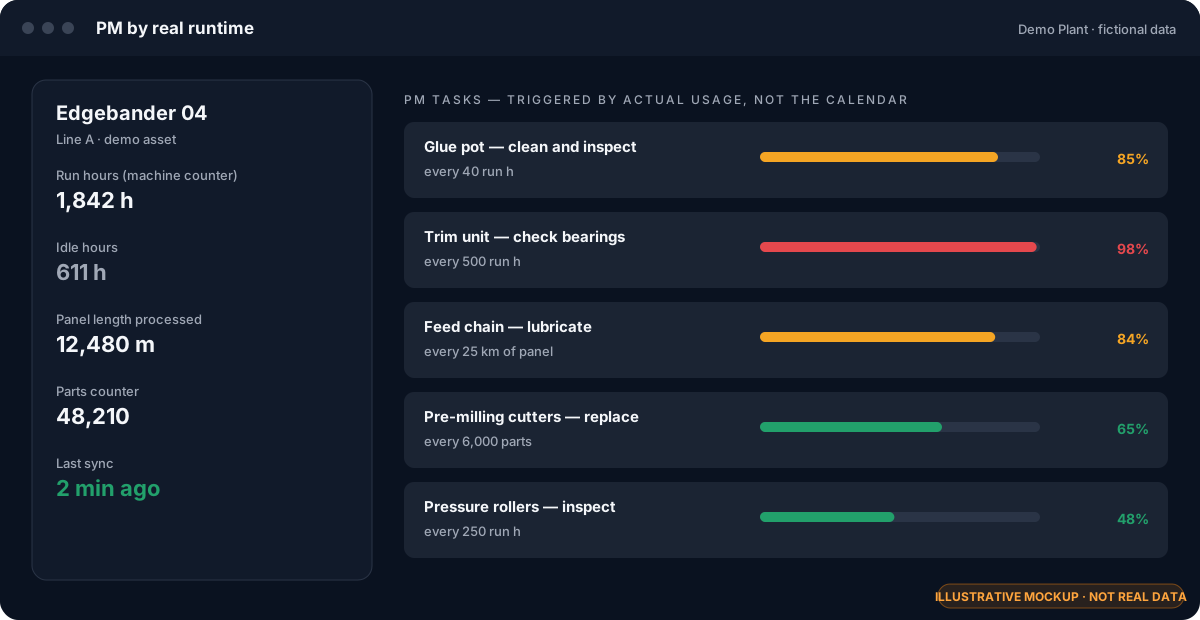
Service intervals follow actual run hours, idle hours, meters and part counts from the machine — so PM happens when the machine needs it.
See the whole plant at a glance
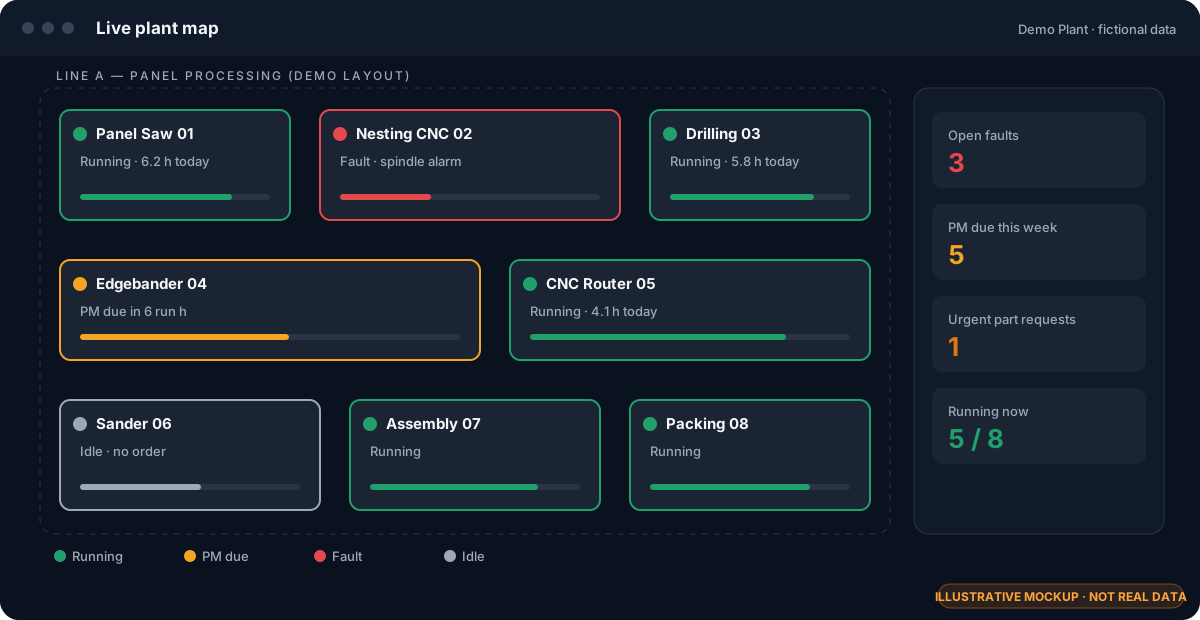
A live 2D/3D map shows every line and machine: running, idle, PM due or down — plus open faults and urgent part requests.
Fault to part to PO — no dropped hand-offs
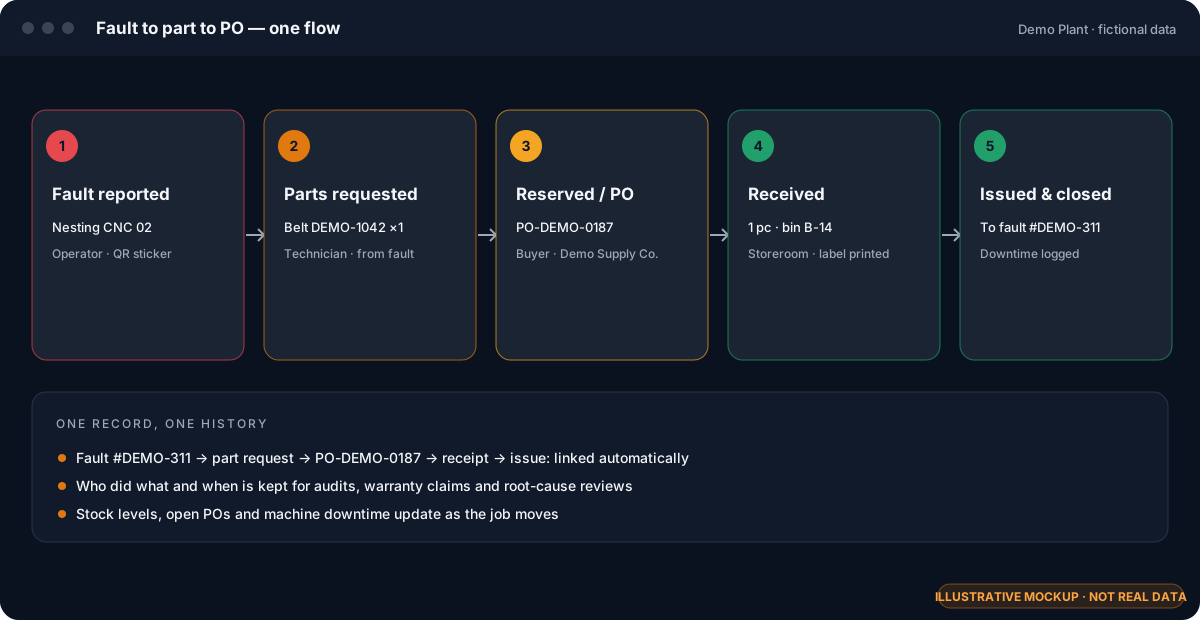
A fault becomes a parts request, then a reservation or purchase order, receiving and issue — all linked, so nothing gets ordered twice or forgotten.
Paper where paper works
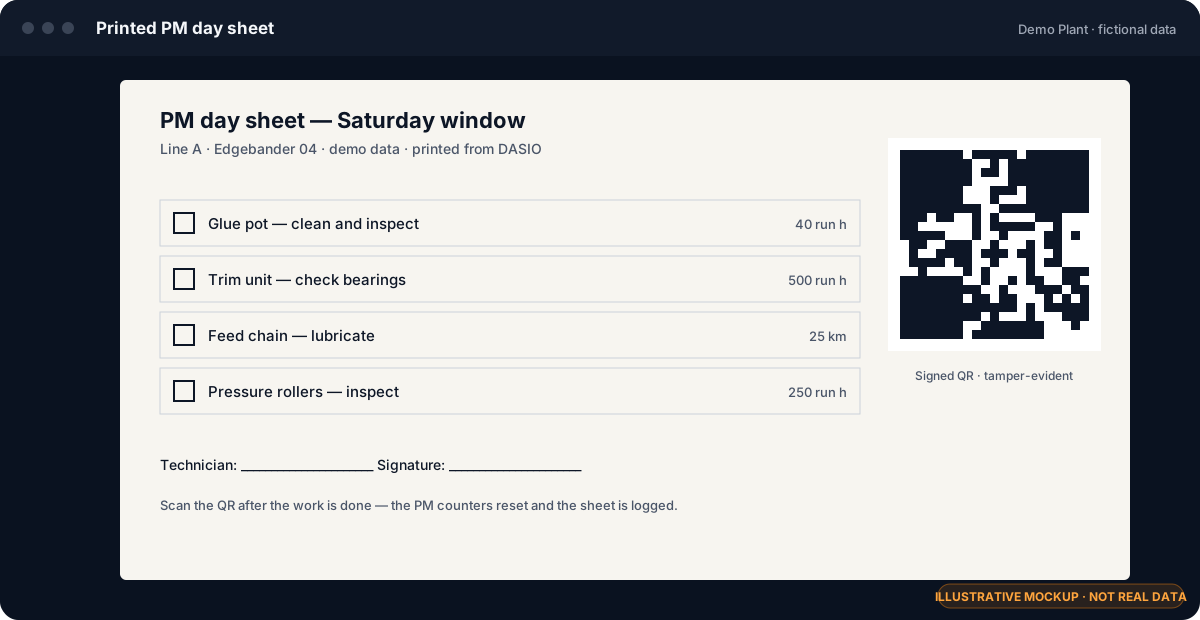
Printed PM day sheets with signed QR codes for the weekend window. Scan when done and the counters reset — no double entry.
How it works
From a fault on the floor to a part on the shelf
ReportOperator scans the machine QR sticker or taps the plant map.
TriageMaintenance attaches photos, the right parts and a priority.
SourceReserve from stock or raise a PO; receive and label on arrival.
PlanDrop the job into a maintenance window and onto a technician.
CloseParts issued, downtime logged, history kept with the machine.
Fault → parts → PO → receiving → issue (mockup, fictional data)PM by run hours, meters and part counts (mockup, fictional data)Printed PM day sheet with signed QR (mockup, fictional data)
2-minute product walkthrough — coming soon. Want to see the real thing now? Book a live demo.
Also included: technician and maintenance-window planners, a knowledge base linked to machines and parts, fault statistics, role-based access, PDF reports and scheduled backups.
Low-risk start
Prove it on one line in 8–12 weeks
A paid pilot on a single line, with your machines, your parts and your techs. If it doesn’t earn its place on the floor, you walk away with your data.
Weeks 1–2
Set up
We import your OEM documentation, machine list and spare parts, draw the line on the plant map and connect runtime counters where available.
Weeks 3–10
Run
Your crew reports faults, runs PM and pulls parts in DASIO every shift. I’m on call for questions and fixes — directly, not through a ticket queue.
Weeks 11–12
Review
We review agreed metrics from your own data — PM completion, fault response time, parts stock-outs — and decide together on a plant-wide rollout.
Simple, per-site pricing
Priced per site, not per technician seat. Choose a single-tenant cloud instance or an on-prem license. Pilot fee is fixed up front.
Install on your own server, or get a dedicated instance — never shared with other companies.
Works on the plant LAN
Keeps working on the local network even when the internet connection drops.
Backups you control
Scheduled backups with retention settings. Export your data any time.
Role-based access
Separate workspaces for admins, operators, technicians and storeroom.
Built on a real plant floor
Hi, I’m Vadzim. I keep machines running.
I’ve spent about 15 years in industrial maintenance — as a Field Service Engineer and now as a maintenance engineer at a furniture plant in North Carolina. I built DASIO because every CMMS I tried was made for the office, not for the tech standing next to a stopped CNC at 2 a.m.
DASIO is the tool I wanted on my own shift: find the part fast, do PM when the machine actually needs it, and stop losing jobs between maintenance and purchasing. When you book a demo, you talk to me — not a sales rep.
You do. On-prem, it never leaves your server. In a single-tenant cloud instance it lives in a database dedicated to your company, and you can export it at any time — including if you stop using DASIO.
Can it run on-premises?
Yes. DASIO can be installed on a server inside your plant and works over the local network without internet access. We can also host a dedicated (single-tenant) instance for you.
Does it integrate with SAP or our ERP?
Parts, suppliers and purchase orders can be imported and exported today. A direct ERP connection is scoped during the pilot based on your system and what your IT team allows.
How long does implementation take?
A pilot line is typically set up in the first two weeks: machines, OEM documentation, spare parts and the plant map. Most of the work is importing what you already have — not retyping it.
Which machines does runtime-based PM work with?
DASIO uses run and idle hours, meters and part counters from the machine. We check what your specific machines can provide during the demo call.
Do my technicians need an app?
No install needed — DASIO runs in the browser on phones, tablets and shop-floor PCs. Techs scan machine QR stickers with their phone camera.
Is the interface available in Spanish?
Yes. Each user picks their language, so English- and Spanish-speaking crews work in the same system.
What documentation can I import?
The documentation your machine suppliers already gave you: OEM manuals, spare-parts catalogs, electrical schematics and maintenance (PM) schedules. Parts become searchable and linked to each machine, and PM schedules turn into tasks. Send us a sample during the demo and we’ll show how it looks.
Book a demo
See DASIO on a line like yours
30 minutes, with the founder. Bring a machine you struggle with — we’ll show how it would look in DASIO.